Control of visiting stopping points
The Control of visiting stopping points report helps monitor whether vehicles actually follow their assigned routes. It shows which stopping points were visited, when a vehicle arrived and departed, and how long it remained at each stopping point.
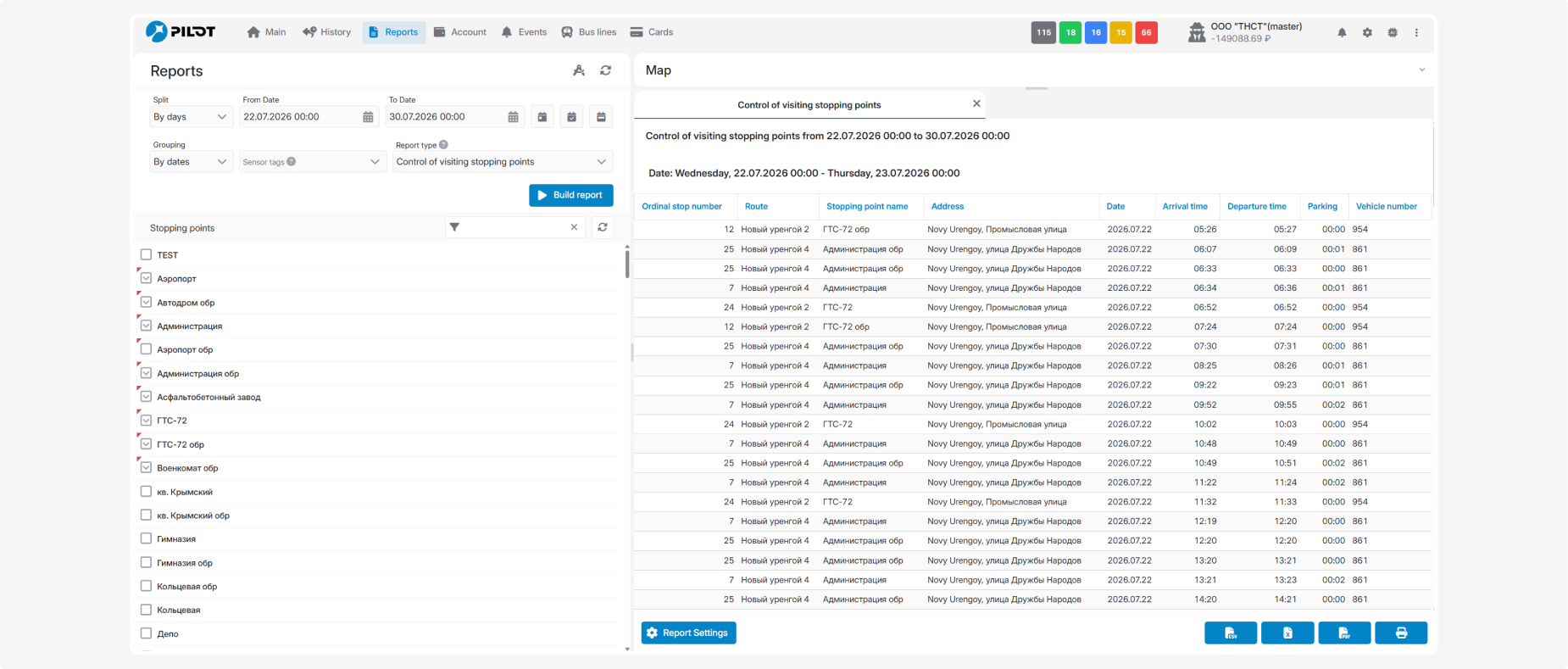
When generating the report, select the stopping points you want to monitor. If several stopping points are selected, the report will display all recorded visits to these stopping points by the selected vehicles during the specified period.
What the report shows
Each row represents one recorded visit to a stopping point by a vehicle.
The report displays the following information:
-
Order stop number — the position of the stopping point in the route sequence
-
Route — the name or number of the route followed by the vehicle
-
Stopping point name — the name of the visited stopping point
-
Address — the location of the stopping point
-
Date — the date on which the stopping point was visited
-
Arrival time — the time when the vehicle arrived at the stopping point
-
Departure time — the time when the vehicle left the stopping point
-
Parking— the amount of time the vehicle remained at the stopping point
-
Vehicle number — the vehicle’s identification number
