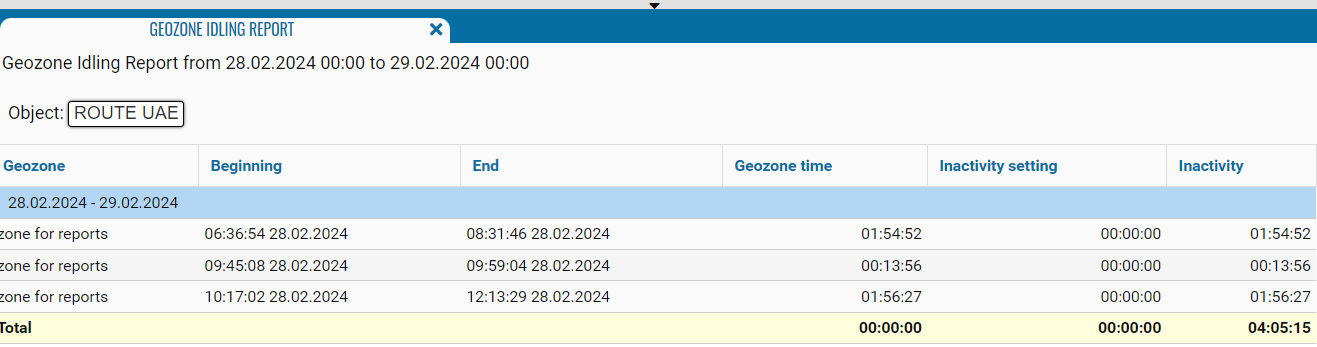
Geozone Idling Report
The report on downtime in a geofence is designed to control the downtime of monitored objects in geographic zones. Available when connecting an additional Geozone module.
What the report shows
• Vehicle (Object) — the monitored vehicle or asset
• Driver — the driver assigned to the vehicle at the time of the idle event
• Department — the group the vehicle belongs to
• Object Type — type of vehicle (passenger car, truck, trailer, etc.)
• Start — date and time when the idle period began
• Stop — date and time when the idle period ended
• Duration — total idle time (hh:mm:ss)
• Address — the idle location address (based on geocoder data). Displayed as a hyperlink — clicking it opens the map with the idle location point
• Coordinates — exact latitude and longitude of the location point
The report contains:
• Geozone - the geographic area in which downtime was recorded.
• Beginning - date and time when the downtime recording started.
• End - date and time of the end of downtime fixing.
• Geozone Time - the time during which the monitored object was in the specified geofence.
• Inactivity setting - allowable downtime in a geofence (set in the object's settings on the "Geofences" tab in the downtime control field).
• Inactivity - downtime of the monitoring object in the geographical area. Equal to the difference between the start and end of downtime minus the allowable downtime.
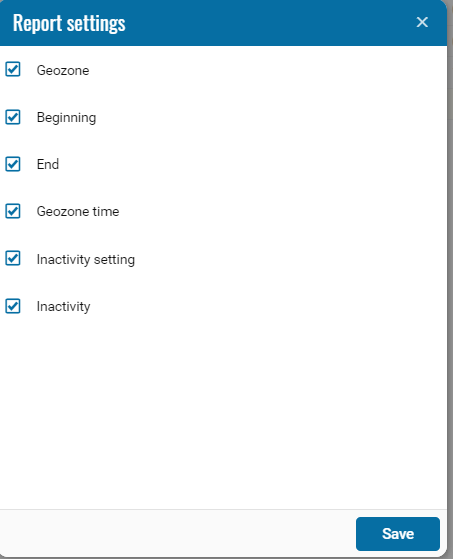
If necessary, you can disable certain parts of the report by clicking on the icon , when pressed, a menu opens where you can disable / enable certain fields.
, when pressed, a menu opens where you can disable / enable certain fields.