Netstar report
The Netstar report is an electronic trip sheet (e-Trip Sheet) that provides detailed information about vehicle operation during the selected period. It shows movement and parking intervals, speed data, mileage, violations, and fuel consumption.
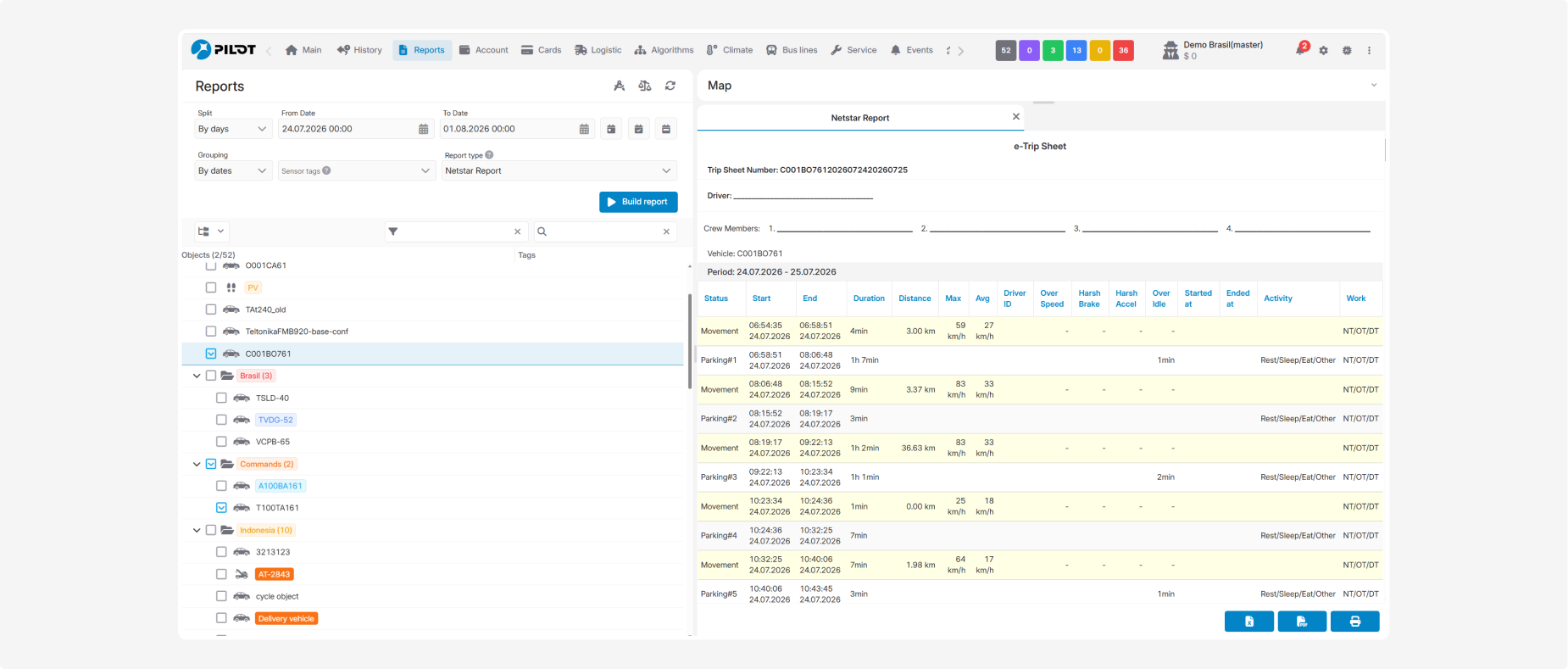
Before building the report, select a period and a vehicle. In the Report parameters window, you can specify:
-
Crew Member 1–4 — crew members
-
Controller — the responsible controller

The entered information is included in the electronic trip sheet.
General information
The top section of the report shows:
-
Trip Sheet Number — the electronic trip sheet number generated by the system
-
Driver — the driver assigned to the vehicle
-
Crew Members — the crew members specified before building the report
-
Vehicle — the name or number of the monitored object
-
Period — the dates covered by the trip sheet

What the report shows
Each row represents a separate movement or parking interval.
-
Status — the vehicle status: movement or a numbered parking interval
-
Start — the date and time when the interval started
-
End — the date and time when the interval ended
-
Duration — the duration of movement or parking
-
Distance — the distance travelled during the movement interval
-
Max — the maximum speed during the interval
-
Avg — the average speed during the interval
-
Driver ID — the driver identifier
-
Over Speed — information about a recorded speeding event
-
Harsh Brake — information about a harsh braking event
-
Harsh Accel — information about a harsh acceleration event
-
Over Idle — the amount of time exceeding the permitted idling limit
-
Started at — the start time of the recorded activity or event
-
Ended at — the end time of the recorded activity or event
-
Activity — the type of activity during a parking interval, for example, Rest/Sleep/Eat/Other
-
Work — the working-time category indicated by the NT/OT/DT codes
If an event was not recorded, a dash is displayed in the corresponding column.
Summary
The bottom section of the report provides the following summary:
-
Total Distance — the total distance travelled
-
Move Time — the total movement duration
-
Parking Time — the total parking duration
-
Number of Stops — the number of recorded parking intervals
-
Average Speed — the average driving speed
-
Max Speed — the maximum recorded speed
-
Fuel consumption (by norma) — estimated fuel consumption based on the configured rate
-
Fuel consumption (by sensor) — fuel consumption calculated from sensor readings
-
Average by norma — average standard fuel consumption per 100 km
-
Average by sensor — average fuel consumption per 100 km based on sensor readings
