Summary mileage report
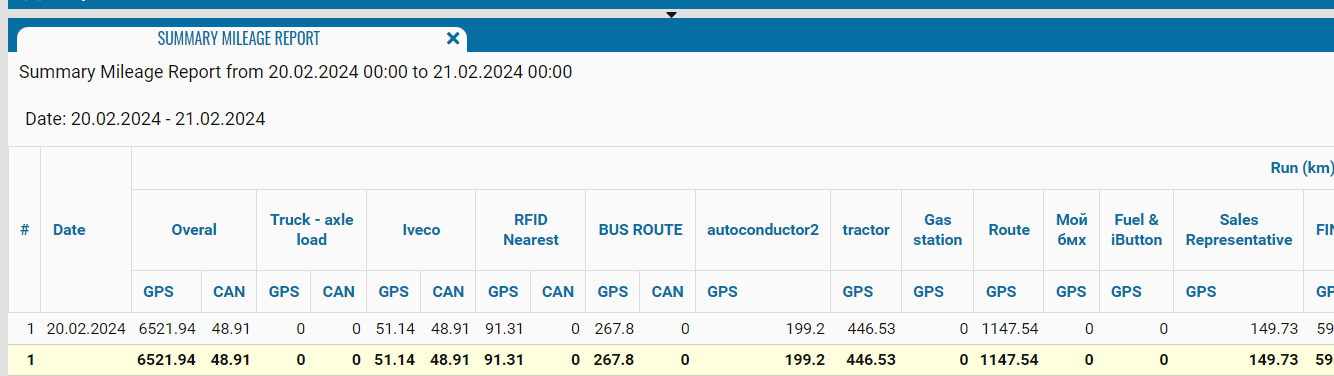
The Summary mileage report provides information about the distance traveled by the selected vehicles during the specified period. It allows you to compare the daily mileage of vehicles based on GPS and CAN data and view the total mileage for the entire reporting period.
The data is grouped by date: each row represents one day, and a separate column is created for each selected vehicle. The selected objects and reporting period are displayed at the top of the report.
What the report shows
• # — row number
• Date — the date for which the mileage was calculated
• Overall — the total mileage of all selected vehicles for the corresponding date
• Vehicle — the name, registration number, or fleet number of the monitored object
• GPS — mileage calculated using GPS coordinates
• CAN — mileage calculated using CAN bus data
The bottom total row shows the total GPS and CAN mileage for the entire selected period, both for all objects combined and for each vehicle separately.
The availability of CAN data depends on the vehicle’s equipment and configuration. If no CAN bus data is received, the corresponding value may be blank or shown as zero.