Tow truck in WASL
This setting enables a separate activity type Towing сar for your company and vehicles when working with WASL.
How to enable Tow truck support:
1. In the Admin panel, open the desired Account
2. Go to the Modules settings tab — click the row with WASL Integration
3. In the Configs block, click Add
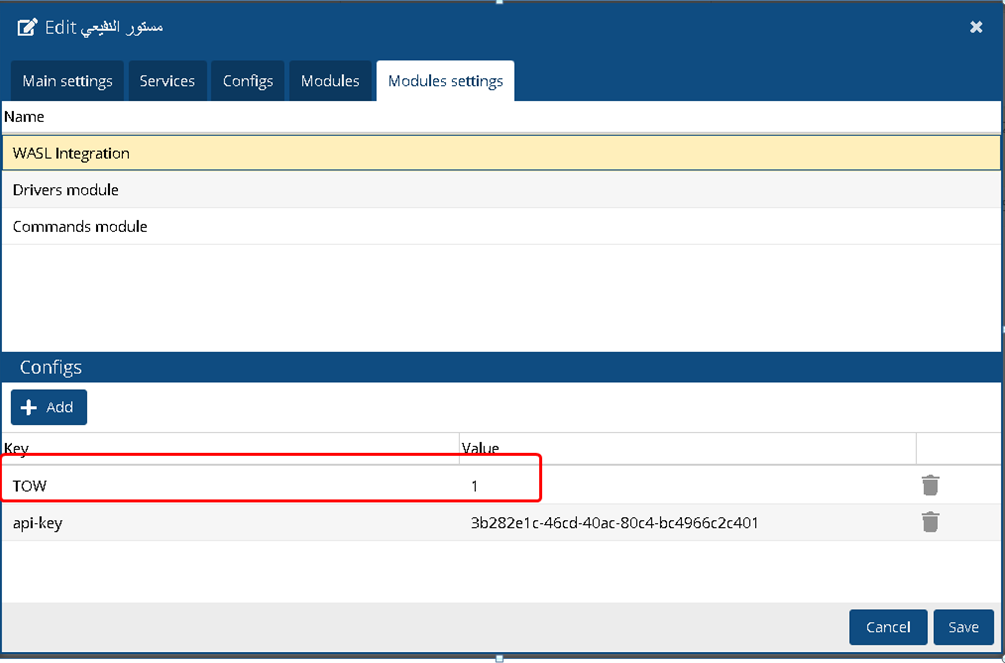
4. Enter the following:
-
Key: TOW
-
Value: 15. Click Save
Once saved, users in their account (under the WASL tab) will be able to select Towing Car in the Company Activity field. This allows the company to register tow trucks or recovery vehicles in WASL.
