Trip report
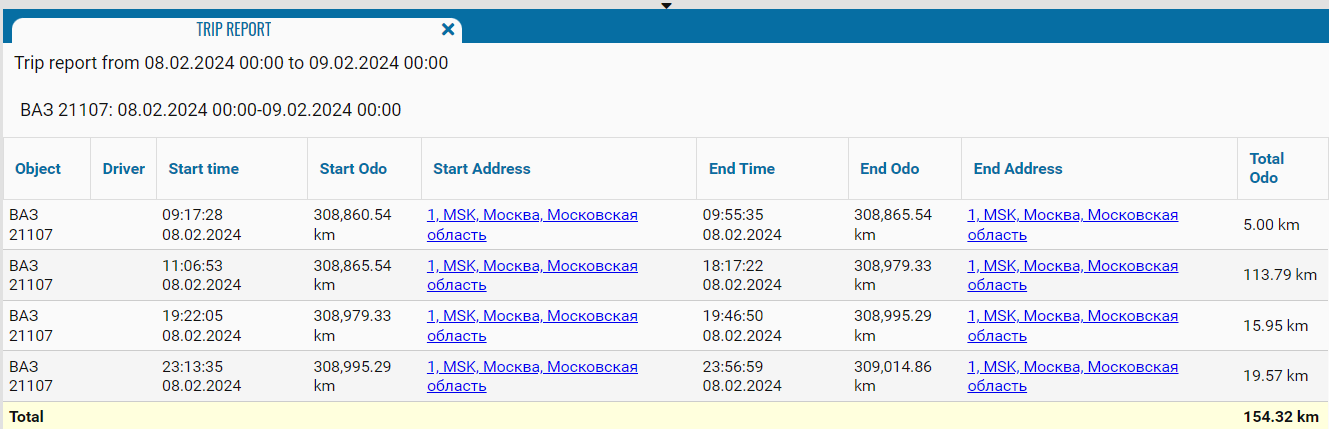
The Trip report provides information about the trips made by the selected vehicle during the specified period. It allows you to determine the start and end time and location of each trip, check the odometer readings, and view the distance traveled.
What the report shows
• Type — the data source used to calculate the trip data, such as CAN
• Object — the vehicle name, registration number, or fleet number
• Driver — the driver assigned to the vehicle during the trip
• Start time — the trip start date and time
• Start Odo — the odometer reading at the beginning of the trip
• Start Address — the address recorded at the beginning of the trip
• End Time — the trip end date and time
• End Odo — the odometer reading at the end of the trip
• End Address — the address recorded at the end of the trip
• Total Odo — the distance traveled during the trip, calculated as the difference between the end and start odometer readings
The bottom Total row shows the total distance traveled by the vehicle during the selected period