Trips and parkings (with drivers)
The Trips and parkings (with drivers) report provides information about vehicle movements and parkings, including the assigned drivers. It allows you to determine who operated the vehicle, when and where trips and parkings occurred, the distance traveled, and the calculated operational indicators.
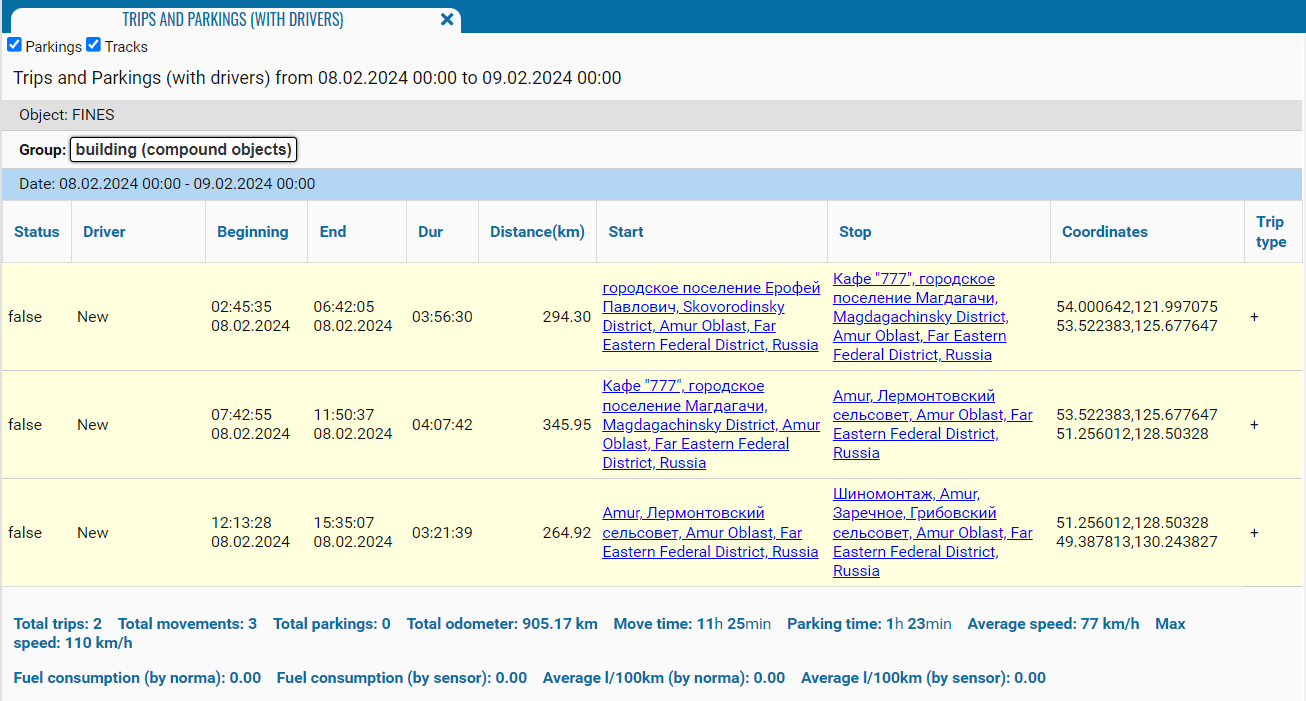
What the report shows
• Status — the object’s status: Movement or Parking; parkings may be assigned a sequence number
• Driver — the driver assigned to the vehicle during the event
• Beginning — the date and time when the movement or parking began
• End — the date and time when the movement or parking ended
• Duration — the duration of the corresponding trip or parking
• Distance — the distance traveled during the trip; no value is displayed for a parking
• Start — the trip start address or parking location
• Stop — the trip end address; no value may be displayed for a parking
• Coordinates — the geographical coordinates of the trip’s start and end points or the parking location
• Max speed — the highest speed recorded during the trip
• Trip type — the trip category determined by the system or the object settings
Addresses in the Start and Stop columns are displayed as links and allow you to open the corresponding locations.

Summary indicators
The following indicators are displayed below the table for each object and date:
• Total trips — the total number of trips
• Total movements — the number of recorded movement periods
• Total parkings — the number of recorded parkings
• Total odometer — the total distance traveled by the vehicle
• Move time — the total movement duration
• Parking time — the total parking duration
• Average speed — the average movement speed for the corresponding period
• Max speed — the highest recorded speed
• Fuel consumption (by norma) — estimated fuel consumption calculated using the configured fuel consumption rate
• Fuel consumption (by sensor) — fuel consumption calculated using sensor data
• Average l/100km (by norma) — estimated average fuel consumption per 100 km
• Average l/100km (by sensor) — average fuel consumption per 100 km calculated using sensor data
Filter by drivers
When the On driver option is enabled, an additional Drivers panel opens next to the object list.

The panel allows you to select one driver, multiple drivers, or an entire driver group. The report will include only events associated with the selected drivers.
