Vehicle usage summary
The Vehicle usage summary provides time-based operating metrics for the selected monitored objects over the specified period. It allows you to compare moving and parking durations, ignition activity, maintenance periods, and determine the net working time.
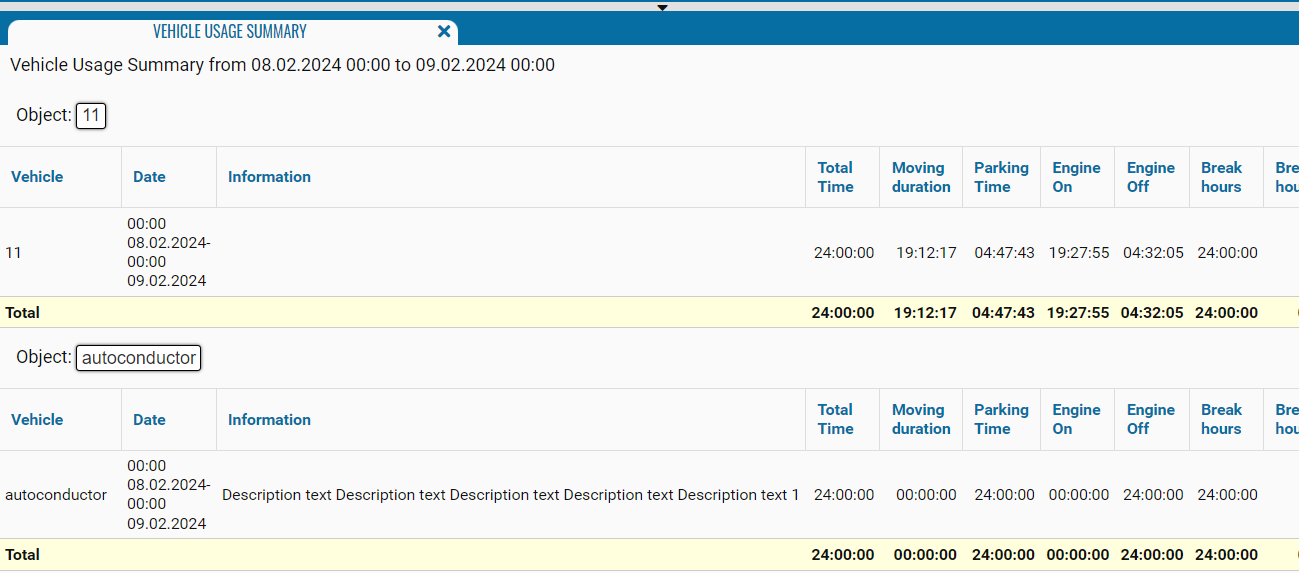
What the report shows
• Vehicle — the name, registration number, or fleet number of the monitored object
• Date — the start and end date and time of the interval for which the metrics were calculated
• Information — additional information about the monitored object; if no information is specified, the field remains blank
• Total Time — the total duration of the corresponding reporting interval
• Moving duration — the total time the object was moving
• Parking Time — the total duration of the object’s parking periods
• Engine On — the total time during which the ignition was registered as on
• Engine Off — the total time during which the ignition was off
• Break hours — the portion of the reporting interval classified as non-working time according to the object’s configured work schedule
• Breakdown hours — the total duration of periods during which the object was undergoing maintenance
• Nett hours — the time within the configured work schedule, excluding maintenance periods. It is calculated as follows: Total Time − Break hours − Breakdown hours

Only work hours
Before building the report, you can enable the Only work hours option. When enabled, the report metrics are calculated only within the working intervals defined in the object’s work schedule.
This option excludes nighttime, weekends, and other non-working intervals from the analysis.
