Activity report
The Activity report provides information about the location and status of vehicles at each recorded route point. It allows you to track vehicle movement and view its speed, direction, coordinates, and status at a specific time.
Before generating the report, select:
-
a period of no more than one day
-
no more than three vehicles
A separate data section is generated for each selected object. Each row represents one point received from the GPS tracker.
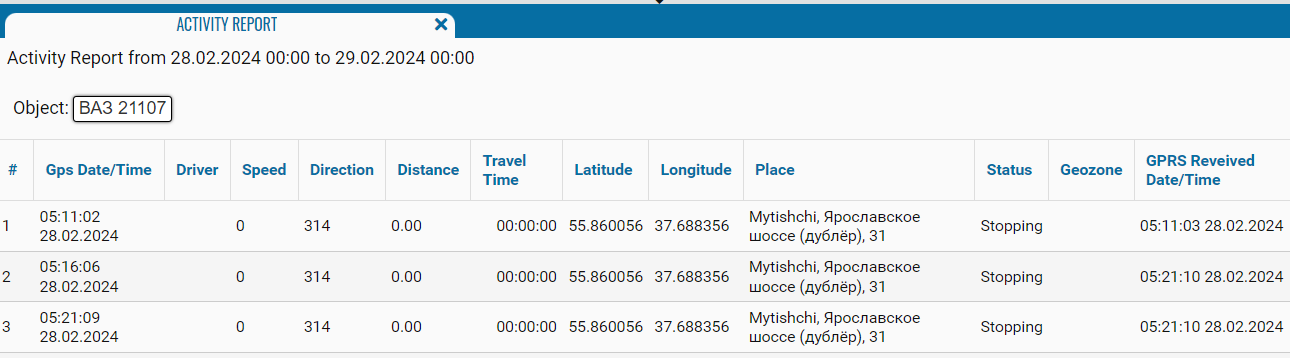
What the report shows
-
# — the point sequence number from the beginning of the selected period
-
Gps Date/Time — the date and time when the point was recorded by the GPS tracker
-
Driver — the name of the driver assigned to the vehicle
-
Speed — the vehicle speed when the point was recorded
-
Direction — the vehicle’s direction of travel in degrees
-
Distance — the distance traveled between recorded points
-
Travel Time — the travel time for the corresponding interval
-
Latitude — the latitude coordinate of the point
-
Longitude — the longitude coordinate of the point
-
Place — the address or description of the vehicle’s location
-
Status — the vehicle status when the point was recorded, for example, Stopping
-
Geozone — the name of the geofence where the vehicle was located
-
GPRS Reveived Date/Time — the date and time when the point was received from the GPS tracker by the system