Object statuses
The indicators on the top panel help you quickly check object statuses: how many are moving, parked, or inactive. The number on each indicator shows how many objects have that status.
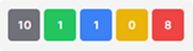
By default, the status palette includes:
 — total number of objects
 — number of objects that are moving
 — number of objects that are parked
 — number of objects idling in a zone
 — number of inactive objects
You can customize the status palette on the top bar. Learn how to do this here.
|
Clicking a status automatically filters the objects list by that status.
For example, click the Moving status to show only moving objects.


Inactive objects status
When you click the inactive status icon, a window opens with a complete list of inactive objects and the duration of inactivity for each. In this window, you can review details for any object and, if needed, download the entire list to Excel.
