Sec by sec
The Sec by sec report contains information about telematics points received by the system from the GPS tracker of the selected object. It allows you to check when each point was recorded and received, as well as its coordinates, speed, heading, ignition status, and other transmitted parameters.
Before building the report, select:
— one vehicle
— a period of no more than one day
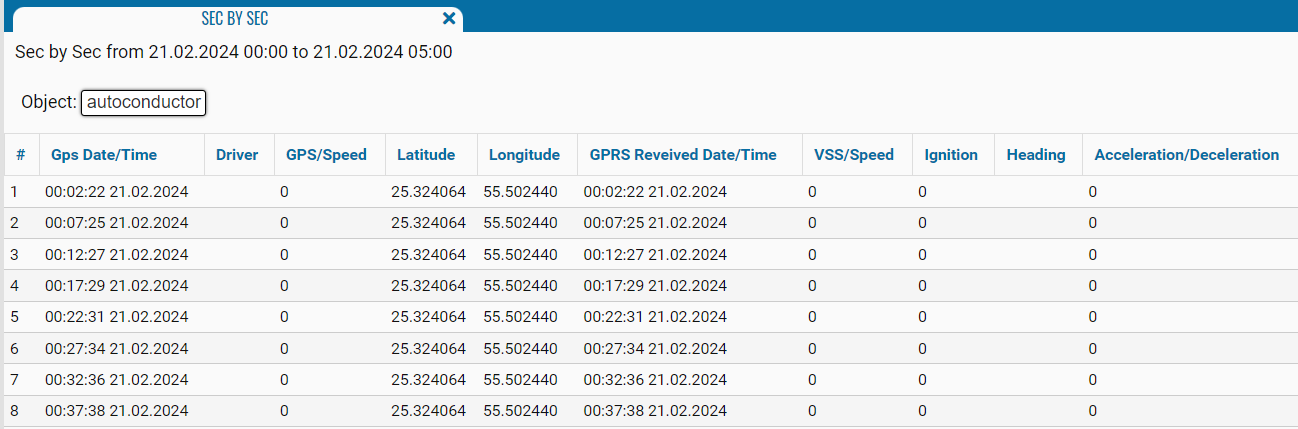
What the report shows
-
# — sequential number of the point
-
Gps Date — date when the point was recorded by the GPS tracker
-
Gps Time — time when the point was recorded by the GPS tracker
-
Driver — driver assigned to the vehicle when the point was recorded
-
Speed — object speed determined from GPS data
-
Latitude — latitude of the object’s location
-
Longitude — longitude of the object’s location
-
GPRS Received Date — date when the point was received by the system
-
GPRS Received Time — time when the point was received by the system
-
Ignition — ignition status when the point was recorded
-
Heading — direction of travel indicated by a compass point, such as N, SE, or W
-
Acceleration/Deceleration — recorded acceleration or deceleration value

Downloading the report
A download button is located next to the Build report button. Use it to download the report in XLSX format for viewing and further processing in a spreadsheet application.
