Daily vehicle report
The Daily vehicle report provides summarized vehicle operating data for the selected period. It allows you to review mileage and travel time, identify trips made outside duty hours, analyze speeding violations, monitor vehicle movement outside geozones, and check idling time.
Report data can be divided into daily sections. Each row represents one vehicle for the specified time interval. The Total row shows the combined values for all vehicles.
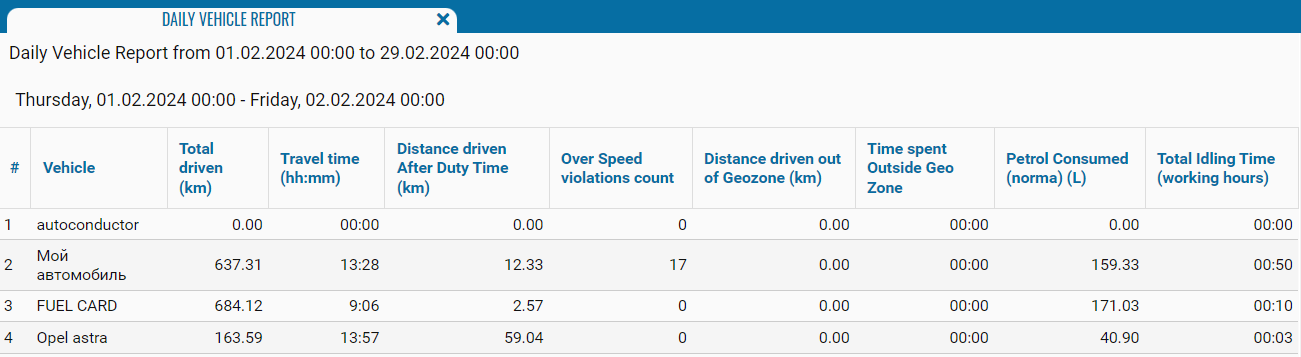
What the report shows
-
# — the row sequence number
-
Vehicle — the name or identification number of the monitoring object
-
Total driven (km) — the total distance traveled during the reporting period
-
Travel time (hh:mm) — the total time spent traveling
-
Distance driven After Duty Time (km) — the distance traveled outside the configured duty hours
-
Over Speed violations count — the number of recorded speeding violations
-
Distance driven out of Geozone (km) — the distance traveled outside the monitored geozones
-
Time spent Outside Geo Zone — the total time the vehicle remained outside the geozones
-
Petrol Consumed (norma) (L) — the estimated fuel consumption calculated according to the configured fuel consumption rate
-
Total Idling Time (working hours) — the total vehicle idling time during the configured working hours