Excessive idle events report
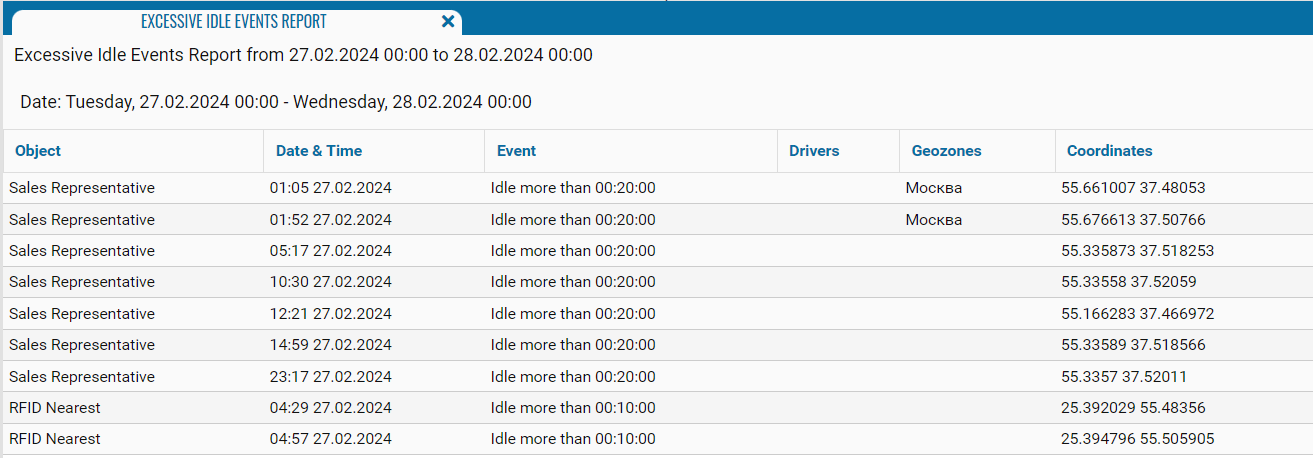
The Excessive idle events report provides information about cases when a monitoring object remained stationary longer than the permitted idle time. It allows you to identify when and where excessive idling occurred, which driver was assigned to the object, and which geozone the object was in.
How an idle event is detected
The permitted idle time is configured in the object card on the Settings tab, in the Idle, sec. field.
An idle event is detected as follows:
1. The vehicle stops
2. The configured idle-time countdown begins
3. If the vehicle does not start moving before this period expires, the system records an event
4. The idle period continues until the vehicle starts moving or the ignition is switched off, if ignition status is taken into account
For example, if the configured idle time is 00:10:00, the event is recorded after the vehicle has remained stationary for more than 10 minutes.
You can also enable ignition monitoring in the object settings. When this option is enabled, an idle event is recorded only if the vehicle remains stationary while the ignition is on.

1 — Configure the permitted idle time
2 — Enable ignition monitoring
What the report shows
-
Object — the name or identification number of the monitoring object
-
Date & Time — the date and time when the idle event was recorded
-
Event — information about the permitted idle time being exceeded, for example, Idle more than 00:10:00
-
Drivers — the driver assigned to the object when the event occurred
-
Geozones — the geozone where the idle event was recorded
-
Coordinates — the latitude and longitude of the object’s location during the idle event