Object card
The object card contains information about the vehicle and the settings of its associated equipment. Here you can edit the object’s main characteristics, configure the device and connection, add SIM cards, set fuel parameters, and enter other information.
To open the object card, double-click an object in the list, or open its context menu and select Edit.
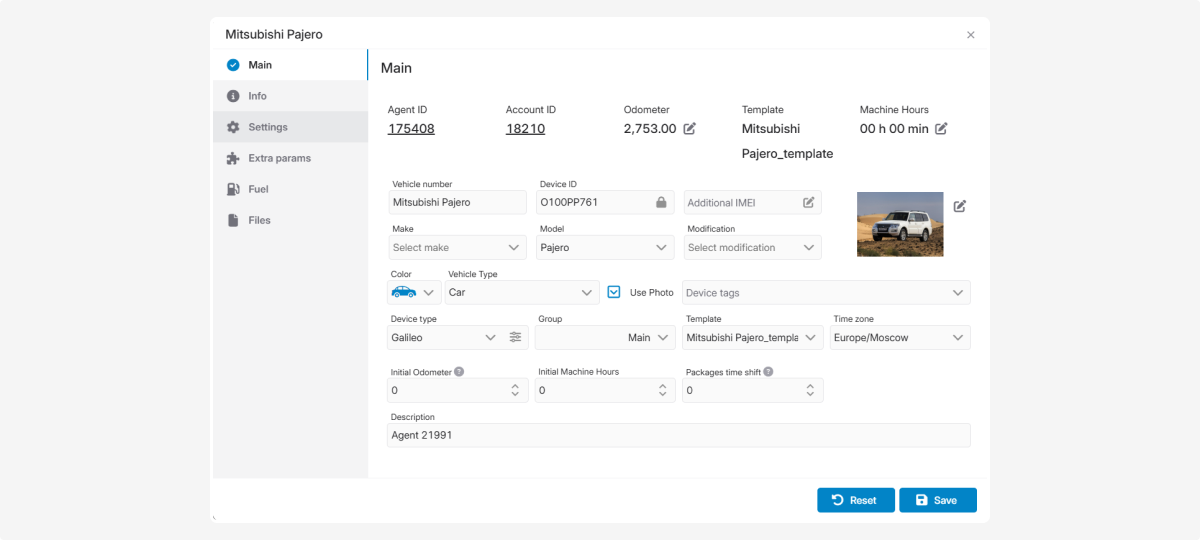
The object card can include the following tabs:
-
Main — vehicle details, its image, device, and connection settings
-
SIM cards — slot numbers, MSISDNs, ICCIDs, and SIM providers for the main and additional devices
-
Info — additional information about the object
-
Settings — object operation and display settings
-
Extra parameters — additional characteristics and settings
-
Fuel — fuel monitoring parameters
-
Files — documents and other files associated with the object

The available tabs depend on the enabled modules and user permissions, so the object card may differ between accounts.
After making changes, click Save. To discard any unsaved changes, click Reset.