Service
The Service module is designed for managing vehicle maintenance.
With this module, you can:
— monitor the condition of your vehicles
— plan scheduled maintenance
— keep records of tires
— log breakdowns and issues
— set reminders for upcoming service tasks
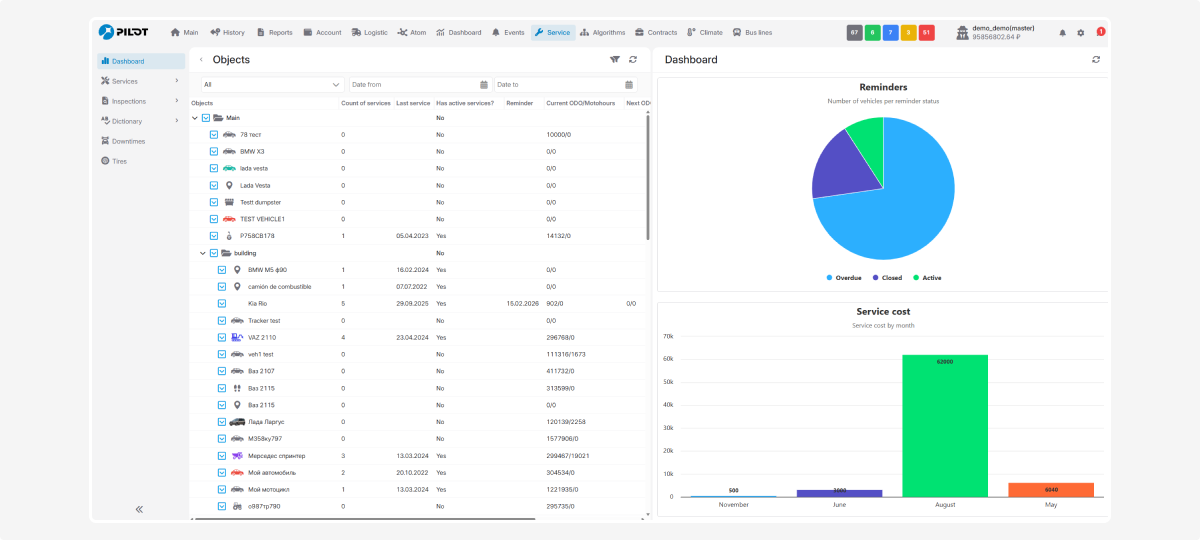
Module structure
The module includes the following tabs:
The Services, Inspections, and Dictionary tabs also contain submenus to help you fine-tune the module’s functionality.
Check the dedicated articles on each tab to learn more about how to use them in detail.
Access rights
You can flexibly configure access rights for each user working with the module.
This allows you to define employee roles and protect service data from unwanted changes.
How to configure access rights
1. Go to Account settings
2. Open the Staff and groups tab
3. Select the required user and double-click on their name
4. In the user profile, open the Rights tab
5. Find the Service module and select the required permissions

The Administrator can configure access separately for the following sections:
-
Services
-
Inspections
-
Dictionary (Suppliers, Service еypes, Works, Parts)
-
Downtime
-
Tires
For each section, you can define the allowed actions:
-
Add — can create new records
-
Edit — can modify existing records
-
Delete — can remove records
You can configure access according to the employee’s role. For example, a manager may have full access, while other users may have view-only permissions.